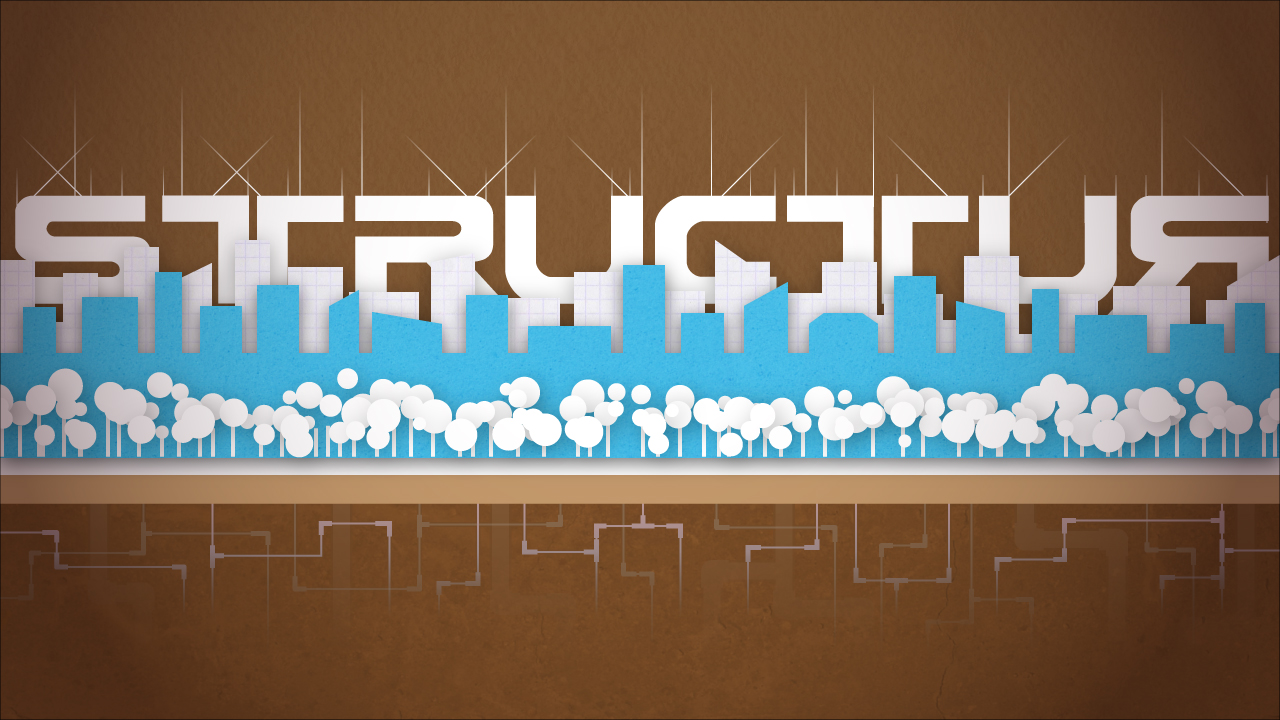
So I've got a new tag/label I've been wanting to try out. It's "breakdown" and that's what I'm going to do right now with a thing I recently finished. I take for granted that I know all these ridiculous little techniques to make things look a certain way that other people out there in YouTube Land may not have figured out yet. If you have any questions you want me to answer or you'd like me to go in-depth on any particular parts of a piece, just let me know and I will. Here's the design I started a couple nights ago and just finished:
This is actually part of a series wherein I'm taking cool scifi-sounding words and doing some kind of design/illustration using them. This one actually happened in reverse, where I dropped in some stand-in text until I figured out what would go well with the city. STRUCTUR seemed to be a fun, brandless word and looked better with no E and a flipped R. Here are the other two I've done so far in the series:
Incidentally, the first one, Dropship, ends up being a really good test of your monitor's color calibration. The yellows on it are a full pixel yellow (proven by eyedroppering it in CMYK), but on some monitors, like my laptop screen, it shows up as this horrible orange. Some monitors with bad contrast tend to blow out the middle of the image instead of showing a decent transition between the yellow and white of the background. So if it looks terrible on your screen, it probably isn't my fault for once.
But anyway, on to the breakdown. Adobe Illustrator CS3 was used for the entirety of the piece. The first thing I did was start making the buildings in the middle. Blue, white, and brown is one of my favorite color combinations ever. I think this may be rooted in me seeing a fine lady in a bathing suit with the same color combination, but we're not here to dissect my id. Picking a color scheme at the beginning is a really good idea because it gives you guidance throughout the rest of the piece. I imagine it's sort of like picking a key when composing a song, but I wouldn't really know because I don't understand a single rotten thing about music.
The buildings were an Alt-duplicated rectangle that I edited as I dragged it along. Since the buildings were all the same color, they look like a solid mass. A wide rectangle along the bottom tied the buildings together and gave them that uniform lower roof line. I did the same thing for the background row of buildings along with a third row that I ended up getting rid of. The slight hint of a texture on the buildings was achieved by putting a high-resolution image of a texture (a dirty wall, graph paper, etc) into a layer and then masking that layer off with a copy of the corresponding building layer. The blending mode of the masked texture was then set to a mode that showed the texture, but let the color and brightness of the building layer through, usually Overlay or Multiply, but in this case Soft Light. It's always a nice touch to adjust color and contrast of textures like this in Photoshop to really fine-tune them before dropping them into Illustrator. Photoshop's also good for using the clone stamp or healing brush to get rid of pesky things like pebbles or scratches that distract from the even texture look you might be trying to achieve. Opacity of the texture layers was also adjusted to taste.
The trees were made in two steps. I created a scatter brush that duplicated, scattered, and scaled a circle shape for the treetops. A few different line widths of this and some overlapping drop-shadowed layers helped to set the treetops apart from one another. The second step was to make the trunks, which are just a simple two-point line shape that I alt-duplicated wherever it seemed pleasing to the eye. I then altered their heights accordingly.
A slight drop shadow was added to the building and tree layers to give them that cutout, slightly 3D look that I apparently love and integrate into basically everything I do. It really pushes things off the paper,or into it in the case of the inner shadow on the word "Dropship" in the above piece.
I hopped through fonts for the text and found one pretty quickly. My stand-in text ("TEXTTEXT") can be seen in the previous post. I wanted something big and blocky with some slight curves that repeated both the hard look of the buildings and the roundness of the trees. This particular font is called Earth Normal and I probably got it off of http://www.dafont.com/, knowing me. I added the little lines up top to emphasize the curves and lines in the letters and they started looking like antennae, so I'm pretty happy with how they fit the theme. They consist of three line types: short lines, long lines, and diagonal lines. I alt-duplicated the lines around wherever they seemed to fit and broke up any symmetry between two diagonal lines with offset-from-center vertical lines. I then put a gradient layer mask on the different line layers to make them fade off at the top like they do.
The pipes were an addition at the end. I tried doing a cross-section of the ground, with a subway tunnel, strata, and pipes, but it got too busy and distracting and I cut it all out except for the pipes. I really like how they ended up mirroring the idea of the antenna lines up top. The pipes themselves made me feel really clever. I drew them with the pen tool and gave them rounded corners. I then duplicated the pipe layer and upped its line width (from 2 to 5), made it all transparent, and then revealed only the joint areas in the layer mask. So you get thin little pipes everywhere and thick pipes revealed only on the corner sections, making it look like joints.
I made the ground and sky textures in the same way I did for the buildings. A really great place to find free high-res textures online is http://www.cgtextures.com/. You can download something like 10MB of textures a day and the subject matter is all across the board, from grungy concrete to fine wood. It's a goldmine. Another awesome place is http://urbandirty.com/. Or just go out with a camera and shoot things yourself at as high resolution as your camera will let you. If you have any weird lighting in the things you shoot, use the High Pass filter on them in Photoshop to even everything out.
I put a vignette over the whole thing too to give it that dark edge/bright center kind of look that just makes it look nicer somehow and pulls your eye to the middle of the piece.
As one last note, I want to bring up the Recolor Artwork tool. This feature started in Illustrator CS3 and has proven an invaluable time saver for my designs. You can select any artwork in your composition with more than one color, and even everything in the entire piece if you want to, and hit the little circular Recolor Artwork icon on your top toolbar. The tool basically lets you recolor everything at once. If you immediately click the "Edit" button at the top of the tool, it takes you to a big HSB color wheel. Press the chain link button at the bottom right under the wheel and you can then move the HSB sliders or points on the color wheel around all over the place to recolor everything in the composition at the same time with the colors still staying the same relative to one another on the color wheel. So you can take a composition that's yellow and orange and see what it would look like if it were shifted to red and blue with the same contrast, brightness, and saturation. It's the closest thing Illustrator has to a Hue/Saturation tool. Both the edit and assign sections of this tool are perfect for minor little adjustments to colors and gradients too.
So that's the breakdown! Let me know if you like it and I'll keep it up. In brief NYC news, I'm still packing boxes and looking for a place to live in Brooklyn.
"Why are you doing this?" "The same reason I do everything, Jen. To have sex with a lady." -Roy, The IT Crowd
Showing posts with label one-day designs. Show all posts
Friday, May 27, 2011
Wednesday, May 25, 2011
Inspiration Doesn't Wear A Watch
I almost decided to wait until tomorrow to post this and just go to bed, especially since I have to get up at 5:30, but then I sat for another hour and some change and started a new design. So if I had time for that, I have time for this.
It's a short post tonight, but I wanted to throw the two designs I'm working on up here since I'm proud of my accomplishments today. I went to Amelie's this evening (incredible 24-hours bakery/coffee shop) and just sat and worked while some gentlemen played some haunting ambient music on their electric guitars behind me. I may go into a little bit of detail about the designs tomorrow if it seems like it would be worthwhile to my Having Slept A Bit brain.
First off, I got the terrible monster image to a point where I'm calling it done. Here!
Comments? Critiques? Suggestions? Keep 'em to yourself! But seriously though, keep them to yourself.
No, send them to me. I was only playing.
I started on this tonight too and I think it has some promise:
So now I will go to bed and read until I burn the coffee off. Goodnight.
“For my part I know nothing with any certainty, but the sight of the stars makes me dream.” -Vincent van Gogh
It's a short post tonight, but I wanted to throw the two designs I'm working on up here since I'm proud of my accomplishments today. I went to Amelie's this evening (incredible 24-hours bakery/coffee shop) and just sat and worked while some gentlemen played some haunting ambient music on their electric guitars behind me. I may go into a little bit of detail about the designs tomorrow if it seems like it would be worthwhile to my Having Slept A Bit brain.
First off, I got the terrible monster image to a point where I'm calling it done. Here!
Comments? Critiques? Suggestions? Keep 'em to yourself! But seriously though, keep them to yourself.
No, send them to me. I was only playing.
I started on this tonight too and I think it has some promise:
So now I will go to bed and read until I burn the coffee off. Goodnight.
“For my part I know nothing with any certainty, but the sight of the stars makes me dream.” -Vincent van Gogh
Friday, May 6, 2011
It Only Gets Grosser From Here
Here's an update to last night's project:
Only got to spend a few hours on it today, but we have eyes now! Their base is a red sphere made in C4D with hella reflectivity (you can see the soft box lights reflecting in their surfaces). The disgusting pupils and irises are from a photograph of clouds with a Spherize filter applied in Photoshop and then warped around with the Liquify tool for variation. Here's a screenshot of the eye stalks being modeled.
The stalks have only begun to make an appearance, but more stalks and eyes come the next time I work on this project (tomorrow? I've got a big weekend ahead of me...). The gross little wart growth things on the stalk were created by dropping a sphere mesh into a Cloner object in Cinema 4D and then adding a Random object to that, which spread the spheres out in a randomized 3-D array and varied their sizes. Then all I had to do was change the input seed until I had something that looked pretty (fucking horrific).
In NYC-related news, there was a pretty awesome flat I was looking at when I visited NYC last month that was the perfect storm of a good price, a good location, a good building, and hella rad roommates. I was under the impression that my renting the place was a pretty sure thing, but that fell apart last week with news from one of the potential roommates that there were other potential renters and that the person leaving may not be leaving as soon as he thought. My contact said we could talk in a week and she'd have a better idea of the situation. Today marked the aforementioned "next week" and she informed me that the only real thing preventing me from living there now was that the Guy Leaving's departure date is up in the air, with it likely falling sometime past the middle of June. I've already resigned myself to searching for other places, so this doesn't really impact my new plan much, save for the fact that the place still has some potential.
Anyway, the full apartment hunt begins next week, with a potential trip back to NYC to scope out my list of flats the following week. Departure date's still set firmly on June 1st, so let's see if I can swing it!
Go read about superfluids now. It'll inspire you...or at least make you think you've gone crazy.
http://en.wikipedia.org/wiki/Superfluidity
"Brad? Have you ever known what it's like to feel the total exhilaration of really flying? Feel this."
Only got to spend a few hours on it today, but we have eyes now! Their base is a red sphere made in C4D with hella reflectivity (you can see the soft box lights reflecting in their surfaces). The disgusting pupils and irises are from a photograph of clouds with a Spherize filter applied in Photoshop and then warped around with the Liquify tool for variation. Here's a screenshot of the eye stalks being modeled.
The stalks have only begun to make an appearance, but more stalks and eyes come the next time I work on this project (tomorrow? I've got a big weekend ahead of me...). The gross little wart growth things on the stalk were created by dropping a sphere mesh into a Cloner object in Cinema 4D and then adding a Random object to that, which spread the spheres out in a randomized 3-D array and varied their sizes. Then all I had to do was change the input seed until I had something that looked pretty (fucking horrific).
In NYC-related news, there was a pretty awesome flat I was looking at when I visited NYC last month that was the perfect storm of a good price, a good location, a good building, and hella rad roommates. I was under the impression that my renting the place was a pretty sure thing, but that fell apart last week with news from one of the potential roommates that there were other potential renters and that the person leaving may not be leaving as soon as he thought. My contact said we could talk in a week and she'd have a better idea of the situation. Today marked the aforementioned "next week" and she informed me that the only real thing preventing me from living there now was that the Guy Leaving's departure date is up in the air, with it likely falling sometime past the middle of June. I've already resigned myself to searching for other places, so this doesn't really impact my new plan much, save for the fact that the place still has some potential.
Anyway, the full apartment hunt begins next week, with a potential trip back to NYC to scope out my list of flats the following week. Departure date's still set firmly on June 1st, so let's see if I can swing it!
Go read about superfluids now. It'll inspire you...or at least make you think you've gone crazy.
http://en.wikipedia.org/wiki/Superfluidity
"Brad? Have you ever known what it's like to feel the total exhilaration of really flying? Feel this."
Thursday, May 5, 2011
I Guess I've Got A Thing For Tentacles
I mentioned yesterday that I was out taking pictures for a Cinema 4D project. C4D is a staple 3-D program in various parts of my field and I'm trying to learn it at a Fool's Pace (so fast that one stumbles over one's feet and crashes through objects with no regard for one's personal well being). I've learned over the years that the best way to learn a program by far is to dream up semi-difficult projects with a start, middle, and finish and then do the projects, figuring out the technical side along the way.
Let me back up a minute and explain the situation I'm in with C4D. Normally, Maxon Cinema 4D runs the purchaser between $1,000 and $3,700, depending on the package, with the former being the stripped-down base 3-D program and the latter being a combination of all of the in-between upgrades in one Giant Package (heh). The trial version, for people considering purchasing the software, is available as a free download on the Maxon website, in any form that's available for purchase. The trial period is unlimited, but the catch is that the user can't render anything bigger than 640x400 pixels and isn't able to save the 3-D file or any renders. A 42-day Saving Period can be activated so the user can save files, but once this ends the software reverts back to its non-save state until a full user license is purchased. I figured the best move was to download the full bells-and-whistles C4D Studio version, learn the hell out of its tools and interface, and then try the save thing if I start making anything really epic.
I used the software for a few days to start to get a feel for it and realized pretty quickly that what I had suspected all along was true: using 3D software is like driving a car. Once you've driven one car for a while, you can really get into anything else that's close to a car in function and pick it up pretty quickly because all of the basic functions are the same. The buttons are just in new places and the handling's a little different. I've had half a decade of experience with Blender (http://www.blender.org/), the Open Source alternative to commercial 3-D software. It's free as in speech, not free as in beer, so it's awesome for the sake of being awesome and has a pretty badass development community. The base functions of Cinema 4D are all almost exactly the same as Blender's, which only a few slight differences; each has a few weaknesses and a few strong points when compared against one another. So if you're thinking of throwing down some Third-Dimension Nonsense, go with Blender and you're effectively getting a $1,000 piece of software for free.
The differences between Blender and C4D, at least from what I can tell at this early stage, really lie in the extensions. The fancy bit of C4D that I've messed around with the most is the MoGraph toolset, which is included in the Broadcast version of the software (and, of course, the Studio version, which has everything). These tools assist the user with motion graphics projects, offering fun, visually-appealing ways to array, duplicate, move, and smash objects. The user can input formulas to control the movement, shape, etc of objects and easily implement randomization into scenes that give them a really healthy does of Kick Assedness. MoGraph even makes use of the Bullet physics library for physical simulations, both rigid body and softbody. Blender can do a basic version of a lot of these functions, and even has the Bullet engine built into it, but mainly relies on the user to extend the tools with drivers and Python scripts to get anything really complicated and gorgeous. If you don't know Python, you're stuck with the basics in Blender (but hey, you're saving THIRTY-SEVEN HUNDRED DOLLARS - maybe it's worth using a tiny fraction of that to buy a book on Python). C4D makes it really easy for the user to pump up some insanely badass shit. A lot of the awesome stuff you see in commercials these days is likely just the result of some asshole clicking a few default settings in C4D and pressing the go button.
So Cinema 4D has been a ton of fun to fux around with and I'd love to use it at whatever place I end up working. I'm not going to abandon Blender anytime soon, but C4D is another great tool for the toolbox. With all of that being said, let's get back to the current art project.
The main idea behind the Cinema 4D project 'pon which I'm embarking is using photos as a bottom layer and then putting fun/awesome 3-D digital stuff on top, resulting in a still image with some cool-assed design stuff worked in, looking photorealistic or stylized in some rad way. I'd love to do it all as animation on top of shot video, but I simply don't have time for that. I need to be spending a day or two on each design piece at most if I want to finish all of the thousand things I need to do before I split next month. Motion can come in the future, where there will somehow be a great surplus of free time. Other alternatives for this project were things like creating a fancy scene entirely in 3-D and rendering it all out, but the inability to save or export images above 640x400 pixels is a major impediment (like a champion skier getting her legs and arms blown off).
The real root behind this project lies in the "analog hole" that's present in C4D. The exportable renders may be limited to 640x400, but there exists in the software a "render viewport" function that renders the currently active viewport in all its final render glory, with ambient occlusion and raytracing and global illumination and everything else a body can dream up. If one full-screens the active Perspective viewport, perhaps after setting the view to a sexy angle or setting up a camera in the scene, the resulting render is whatever the resolution of the monitor happens to be. So a 1920x1200 monitor (my laptop screen), minus the program's menus and frame, yields something close to an HD image. The real magic of this "analog hole" (The Analog Hole: sexy 70s music-themed porno idea?) is the PrintScreen button on the keyboard, which as many of you may know dumps your screen's forward image buffer directly to the clipboard, ready to paste into Photoshop. There's no easy way to get any transparency or alpha channels from this method, so most 3-D items need to be cut out by hand in Photoshop, but it's a small price to pay for a potential Awesome Result and proof that I can use the software. It also yields a very fun collage nature to the project, letting me render out each component and scoot, stretch, and recolor it until it fits nicely into the photograph. The extremely temporal nature of the 3-D files is also thrilling in its own way, kind of like graffiti or something, all knowing that it will go away soon and you'll be left with only the things you initially rendered out.
So i started working on an image tonight, rendering the 3-D parts in C4D and working them up in Photoshop.
Here's the original photograph, extended and balanced a little bit in Photoshop:
The Cinema 4D additions I made are next. A lot of the time was spent learning the sweep NURBS tools to make the tentacles.
The tentacles were each rendered in C4D (in a file which has now been lost to the sands of time) and all of the shadows and a few of the highlights were either painted by hand in Photoshop or created with some clever (if I do say so myself (which I do)) blurring and stretching of the original tentacle layers.
And here's the Photoshop mock-up of what's to come.
Tomorrow's work is mainly going to be about using sweep NURBS some more, getting the flow of HDRI reflections, and creating some nice gross materials for the eyeball stalks. I'd like to end up lining the eyes and stalks up like some kind of horrific all-seeing flower blossom. I may even have some cruddy pollen-like shit flying/floating out to go with the Terrible Flower theme and add to the overall horrificness of the piece (which is becoming a well-set theme in my life). It should be fun to see how this piece evolves.
"There will never be a dearth of places for skilled people, but we have to recognize that the will to be skilled is not general. And even if the will be present, then the courage to go through with the training is absent. One cannot become skilled by mere wishing." -Henry Ford, My Life and Work
Let me back up a minute and explain the situation I'm in with C4D. Normally, Maxon Cinema 4D runs the purchaser between $1,000 and $3,700, depending on the package, with the former being the stripped-down base 3-D program and the latter being a combination of all of the in-between upgrades in one Giant Package (heh). The trial version, for people considering purchasing the software, is available as a free download on the Maxon website, in any form that's available for purchase. The trial period is unlimited, but the catch is that the user can't render anything bigger than 640x400 pixels and isn't able to save the 3-D file or any renders. A 42-day Saving Period can be activated so the user can save files, but once this ends the software reverts back to its non-save state until a full user license is purchased. I figured the best move was to download the full bells-and-whistles C4D Studio version, learn the hell out of its tools and interface, and then try the save thing if I start making anything really epic.
I used the software for a few days to start to get a feel for it and realized pretty quickly that what I had suspected all along was true: using 3D software is like driving a car. Once you've driven one car for a while, you can really get into anything else that's close to a car in function and pick it up pretty quickly because all of the basic functions are the same. The buttons are just in new places and the handling's a little different. I've had half a decade of experience with Blender (http://www.blender.org/), the Open Source alternative to commercial 3-D software. It's free as in speech, not free as in beer, so it's awesome for the sake of being awesome and has a pretty badass development community. The base functions of Cinema 4D are all almost exactly the same as Blender's, which only a few slight differences; each has a few weaknesses and a few strong points when compared against one another. So if you're thinking of throwing down some Third-Dimension Nonsense, go with Blender and you're effectively getting a $1,000 piece of software for free.
The differences between Blender and C4D, at least from what I can tell at this early stage, really lie in the extensions. The fancy bit of C4D that I've messed around with the most is the MoGraph toolset, which is included in the Broadcast version of the software (and, of course, the Studio version, which has everything). These tools assist the user with motion graphics projects, offering fun, visually-appealing ways to array, duplicate, move, and smash objects. The user can input formulas to control the movement, shape, etc of objects and easily implement randomization into scenes that give them a really healthy does of Kick Assedness. MoGraph even makes use of the Bullet physics library for physical simulations, both rigid body and softbody. Blender can do a basic version of a lot of these functions, and even has the Bullet engine built into it, but mainly relies on the user to extend the tools with drivers and Python scripts to get anything really complicated and gorgeous. If you don't know Python, you're stuck with the basics in Blender (but hey, you're saving THIRTY-SEVEN HUNDRED DOLLARS - maybe it's worth using a tiny fraction of that to buy a book on Python). C4D makes it really easy for the user to pump up some insanely badass shit. A lot of the awesome stuff you see in commercials these days is likely just the result of some asshole clicking a few default settings in C4D and pressing the go button.
So Cinema 4D has been a ton of fun to fux around with and I'd love to use it at whatever place I end up working. I'm not going to abandon Blender anytime soon, but C4D is another great tool for the toolbox. With all of that being said, let's get back to the current art project.
The main idea behind the Cinema 4D project 'pon which I'm embarking is using photos as a bottom layer and then putting fun/awesome 3-D digital stuff on top, resulting in a still image with some cool-assed design stuff worked in, looking photorealistic or stylized in some rad way. I'd love to do it all as animation on top of shot video, but I simply don't have time for that. I need to be spending a day or two on each design piece at most if I want to finish all of the thousand things I need to do before I split next month. Motion can come in the future, where there will somehow be a great surplus of free time. Other alternatives for this project were things like creating a fancy scene entirely in 3-D and rendering it all out, but the inability to save or export images above 640x400 pixels is a major impediment (like a champion skier getting her legs and arms blown off).
The real root behind this project lies in the "analog hole" that's present in C4D. The exportable renders may be limited to 640x400, but there exists in the software a "render viewport" function that renders the currently active viewport in all its final render glory, with ambient occlusion and raytracing and global illumination and everything else a body can dream up. If one full-screens the active Perspective viewport, perhaps after setting the view to a sexy angle or setting up a camera in the scene, the resulting render is whatever the resolution of the monitor happens to be. So a 1920x1200 monitor (my laptop screen), minus the program's menus and frame, yields something close to an HD image. The real magic of this "analog hole" (The Analog Hole: sexy 70s music-themed porno idea?) is the PrintScreen button on the keyboard, which as many of you may know dumps your screen's forward image buffer directly to the clipboard, ready to paste into Photoshop. There's no easy way to get any transparency or alpha channels from this method, so most 3-D items need to be cut out by hand in Photoshop, but it's a small price to pay for a potential Awesome Result and proof that I can use the software. It also yields a very fun collage nature to the project, letting me render out each component and scoot, stretch, and recolor it until it fits nicely into the photograph. The extremely temporal nature of the 3-D files is also thrilling in its own way, kind of like graffiti or something, all knowing that it will go away soon and you'll be left with only the things you initially rendered out.
So i started working on an image tonight, rendering the 3-D parts in C4D and working them up in Photoshop.
Here's the original photograph, extended and balanced a little bit in Photoshop:
The Cinema 4D additions I made are next. A lot of the time was spent learning the sweep NURBS tools to make the tentacles.
The tentacles were each rendered in C4D (in a file which has now been lost to the sands of time) and all of the shadows and a few of the highlights were either painted by hand in Photoshop or created with some clever (if I do say so myself (which I do)) blurring and stretching of the original tentacle layers.
And here's the Photoshop mock-up of what's to come.
Tomorrow's work is mainly going to be about using sweep NURBS some more, getting the flow of HDRI reflections, and creating some nice gross materials for the eyeball stalks. I'd like to end up lining the eyes and stalks up like some kind of horrific all-seeing flower blossom. I may even have some cruddy pollen-like shit flying/floating out to go with the Terrible Flower theme and add to the overall horrificness of the piece (which is becoming a well-set theme in my life). It should be fun to see how this piece evolves.
"There will never be a dearth of places for skilled people, but we have to recognize that the will to be skilled is not general. And even if the will be present, then the courage to go through with the training is absent. One cannot become skilled by mere wishing." -Henry Ford, My Life and Work
Wednesday, May 4, 2011
Tracking the Storm
I drove out to Karl's place tonight to return a computer and it turned out to be one of the best decisions I've made this week. I knew there were going to be thunderstorms tonight, but nobody told me the sky would be on fire. Heat lightning blasted across the sky every couple of seconds and it all eventually culminated in a downpour. I ended up driving to Midtown Target and parking on the roof of the deck to watch the storm. Some low-hanging clouds covered Uptown while I was there and the Duke Energy building, glowing an awesome orange and red, looked like it was slowly burning as its light reflected off of the moisture around it. The windows are open now and everything smells amazing.
So color me inspired.
I went out into NoDa earlier to take some pictures for a jumping-off point for some short Cinema 4D art projects I want to work up. I've got this idea called One-Day Designs, wherein I only spend a day on a design piece, from start to finish, sometimes overlapping a night, with half a day's work over two days, so I have time to sleep on it. While I was out, I took these beuts:
Re-realization of the day: if you shoot on a 7D (or about a billion other cameras) and need to open your raw files in Photoshop CS3 on Windows XP, get the Adobe DNG Converter to dump all of your files to digital negatives so Photoshop can read them.
Aside from those shots, I now have some good ammo to work some Cinema 4D magic with. I'll put a thing up tomorrow about my experiences with C4D and how it compares to the 3-D stuff I already know, in case you happened to be wondering about that sort of thing.
Here's a music video posted recently on Facebook by someone incredible I know. I can't stop listening to the song and adoring the video.
http://www.youtube.com/watch?v=gH2efAcmBQM
"A human being should be able to change a diaper, plan an invasion, butcher a hog, conn a ship, design a building, write a sonnet, balance accounts, build a wall, set a bone, comfort the dying, take orders, give orders, cooperate, act alone, solve equations, analyze a new problem, pitch manure, program a computer, cook a tasty meal, fight efficiently, die gallantly. Specialization is for insects." - Robert Heinlein
So color me inspired.
I went out into NoDa earlier to take some pictures for a jumping-off point for some short Cinema 4D art projects I want to work up. I've got this idea called One-Day Designs, wherein I only spend a day on a design piece, from start to finish, sometimes overlapping a night, with half a day's work over two days, so I have time to sleep on it. While I was out, I took these beuts:
Re-realization of the day: if you shoot on a 7D (or about a billion other cameras) and need to open your raw files in Photoshop CS3 on Windows XP, get the Adobe DNG Converter to dump all of your files to digital negatives so Photoshop can read them.
Aside from those shots, I now have some good ammo to work some Cinema 4D magic with. I'll put a thing up tomorrow about my experiences with C4D and how it compares to the 3-D stuff I already know, in case you happened to be wondering about that sort of thing.
Here's a music video posted recently on Facebook by someone incredible I know. I can't stop listening to the song and adoring the video.
http://www.youtube.com/watch?v=gH2efAcmBQM
"A human being should be able to change a diaper, plan an invasion, butcher a hog, conn a ship, design a building, write a sonnet, balance accounts, build a wall, set a bone, comfort the dying, take orders, give orders, cooperate, act alone, solve equations, analyze a new problem, pitch manure, program a computer, cook a tasty meal, fight efficiently, die gallantly. Specialization is for insects." - Robert Heinlein
Subscribe to:
Posts (Atom)


